Adjust Exchange Rates on BTA Ledger Entries
With the function Adjust Exchange Rates it is possible to make Exchange adjust that will make a General Ledger Entry like the standard Business Central function for Adjusting Exchange rates on customer, vendor and bank post.
The function is found on the BTA Role Center below Application. BTA will also suggest to Adjust Exchange Rates if the Settlement is started for BTA Ledger Entries with a currency code.
When the function is chosen below window will open.
Note
As default there is set two Filters on the BTA Ledger Entry. Marked for Application is Yes and Posting type is Accrual. Therefore only non settled Accruals will be adjust. It is possible to change these filter, so other types can be adjusted, but normally only non settled Accruals need to be adjusted.
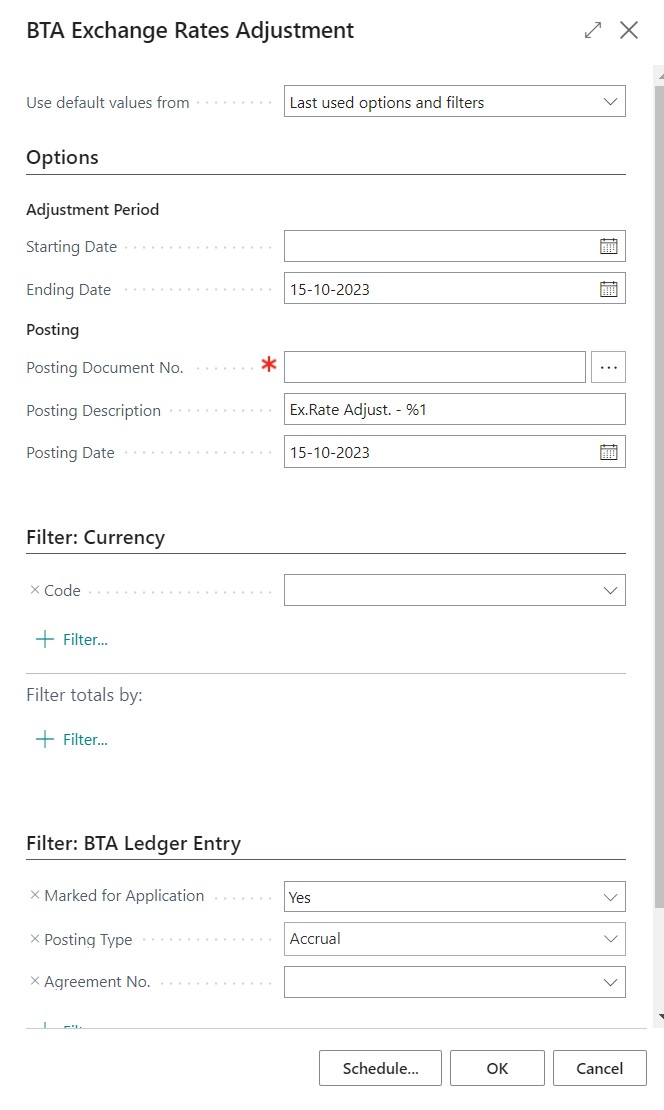
The Adjust Exchange Rate Option
Below a short explanations on the options field on the Adjust Exchange rate report:
- The Starting and Ending Date filters on the BTA Ledger Entry Posting Date.
- The Posting date is also the date of the currency factor which will be used to make the adjustment.
- Besides above it is possible to filter on the Currency and the BTA Ledger Entry Table.
The Adjust Exchange Rate functions
For every BTA Ledger Entry within the Filter there will be posted a new BTA post, that will look like the original. The amount will be the Exchange rate adjustment amount in blank currency. Marked for Application will always be false and the BTA Ledger Entry number will come from the number series on BTA Setup.
On the BTA Ledger Entry it is possible to see if a entry has been Exchange Adjust on the field Curr. Exch. Rate Adjust which show the total adjusted amount.
On the BTA Ledger Entry it is possible to see if a entry is a Exchange Rate Adjustment on the field Exch. Rate Adj. of Entry No. which show which Entry No. has been adjusted.
For every BTA Ledger Entry there is adjust, there is also generated a General Ledger Entry. This Entry is posted with the BTA Posting Setup.